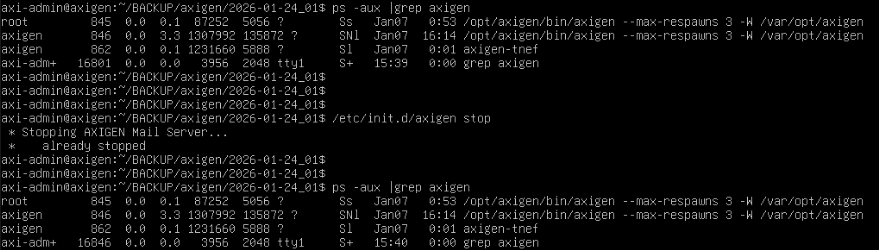
When trying to do my first update on my VM instance of Axigen, the instructed command to shutdown the service (“/etc/init.d/axigen stop”) does not work.
In fact it immediately reports “already stopped”, when in fact it is NOT already stopped. I tried this several times, always the same result.
So I ultimately resorted to shutting down the OS to stop it (“sudo shutdown -r now”) and while this seemed to eventually work, the OS had to wait approx 1.5 additional minutes for the Axigen services to stop before it could restart.
The server did appear to apply the latest updates anyway even though the service was apparently not shutdown when I installed it (“sudo apt install [.deb name]”) but I’d like to know if I’m doing something wrong here.
Also, after doing the update, I got another error, a permission error:
“Download is performed unsandboxed as root as file [.DEB file] couldn’t be accessed by user ‘_apt’, - pkgAcquire::Run (13: Permission denied)
Is there something I’m doing wrong here? (see screenshots)
[Update: got a “422” error when trying to post, maybe it’s the screenshots? I’ll try a separate post for them]