Dear community members,
unfortunately I tried to get the FTP-Backup running without success:
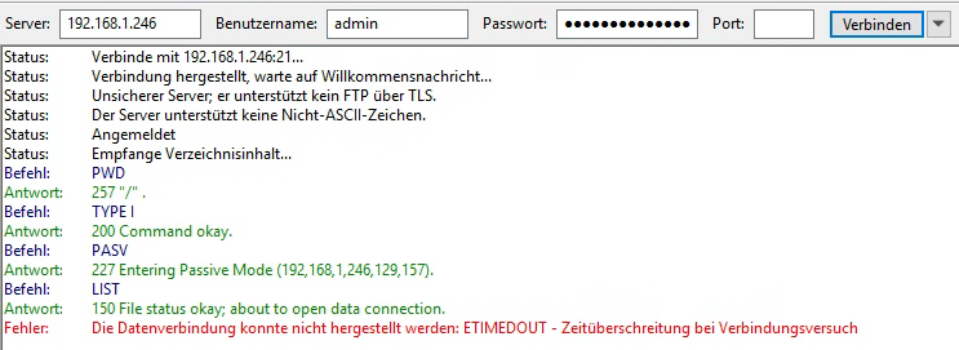
This is crucial for me to use it in a production environment.
No matter what I do I cannot connect. Does anyone know what to do here?
Kind regards
Daniel
Community
Dear community members,
unfortunately I tried to get the FTP-Backup running without success:
This is crucial for me to use it in a production environment.
No matter what I do I cannot connect. Does anyone know what to do here?
Kind regards
Daniel
In passive mode FTP (as indicated by the PASV command in your output) the server chooses a random port for the client to connect to. This requires opening a range of ports on a firewall for the client to connect back to, and the server uses one of the ports in this range for the connection. If you don’t have those configured or open, then the FTP data communication (everything after LIST) will fail.
My guess is that your FTP client is connecting back to a port that’s blocked by a host-based firewall.
Since the FTP configuration panel doesn’t offer anything for configuring the range of ports that passive mode uses, you’ll have to find out from Axigen if this range is fixed or not.
Make sure that you also have SSL/TLS turned on for the FTP listener. Without TLS you’re sending your admin password and all of your data across the wire in plaintext. Yay!
IMO only offering FTP as a backup solution is a poor choice on Axigen’s part. What about the database? You can’t back up a live database over FTP. This is why the docs say that the axigen services must be stopped before doing any backup. At that point you’re just backing up the raw data with nothing running that can modify it.
Since that’s the case, you can also just use SSH and a script that stops the server, archives all of /axigen, and then starts the server again. If you’re running with a filesystem type that supports snapshots, then you can reduce downtime by stopping the server, snapshotting the filesystem, and then starting the server again. Once that’s complete (seconds), you can mount the snapshot and archive everything inside of it while the mailserver continues to process mail.
Also make sure you have a secondary MX somewhere that collects mail while the primary server is down. You don’t want to be making backups and rejecting mail at the same time.
Hi monachus,
thank you very much for your detailed reply  ! I checked the things you mentioned prior posting. While testing I found out that the only problem why FTP-Backup wasn’t working is a password which contained characters which aren’t supported (in my case “!”). This led to not allowing me to connect to the service. After changing the password I could access the internal Axigen FTP-Server. As far as I understood this FTP-Backup function generates consistent data which can be downloaded without disabling the service. I am thinking about working with a pre- and post-script to disable services while backing up with Veeam Backup & Replication. Right now it’s Broadcom VMware ESXi but it will be transitioned to Proxmox VE soon.
Thank you and have a good one!
Daniel