Hi guys.
my main mail provider moved its mail accounts to office365. bummer
i am using axigen web mail as a central point where all my various mail accounts get pulled togehter
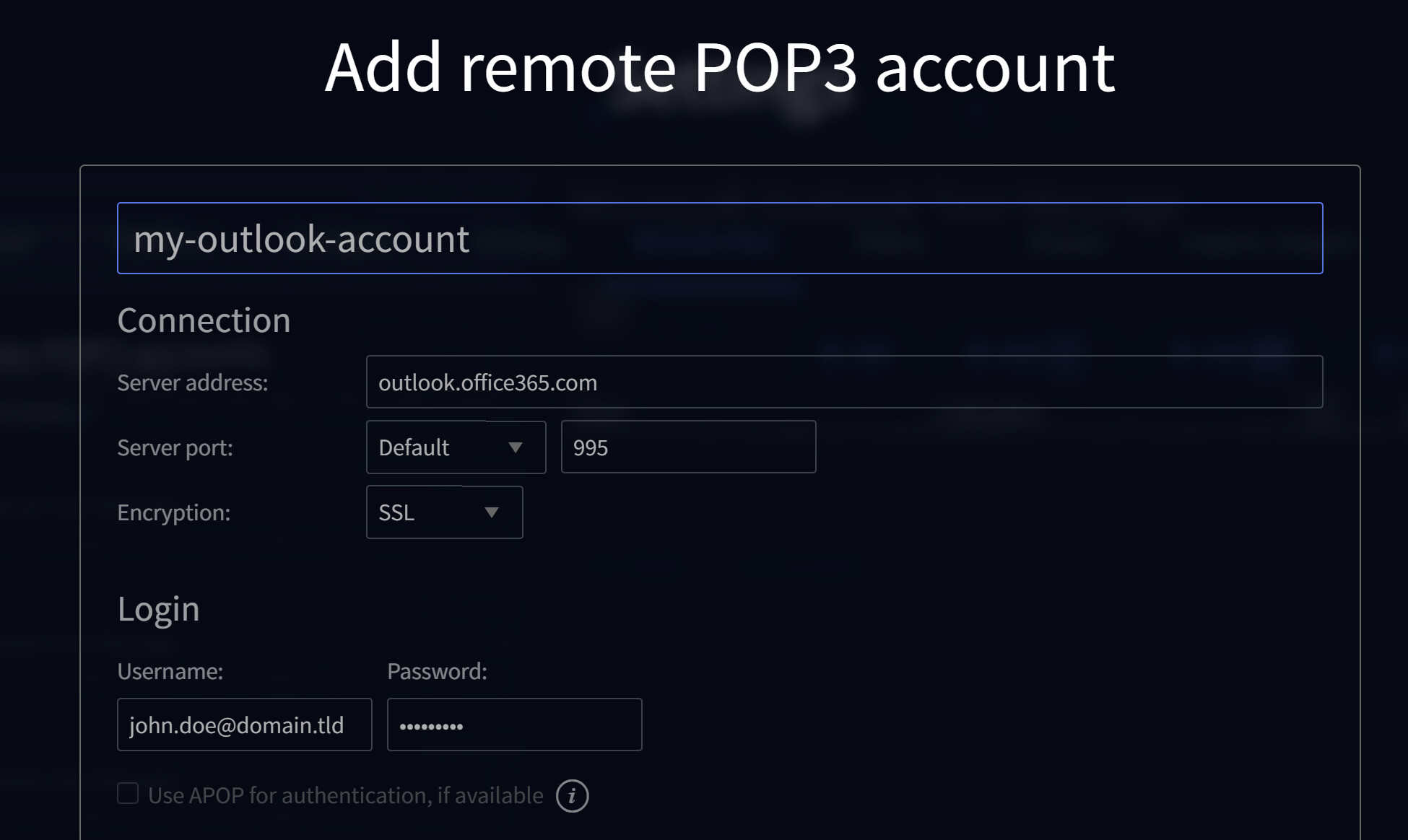
they are added via the web mail ui under settings - remote mail - pop 3
in the past that worked splendit.
after the merger of the provider to office365 it stopped working
so called them today, they activated pop 3 access again and i thought i was happy.
but - turns out - no dice
it still says “authentication failure”
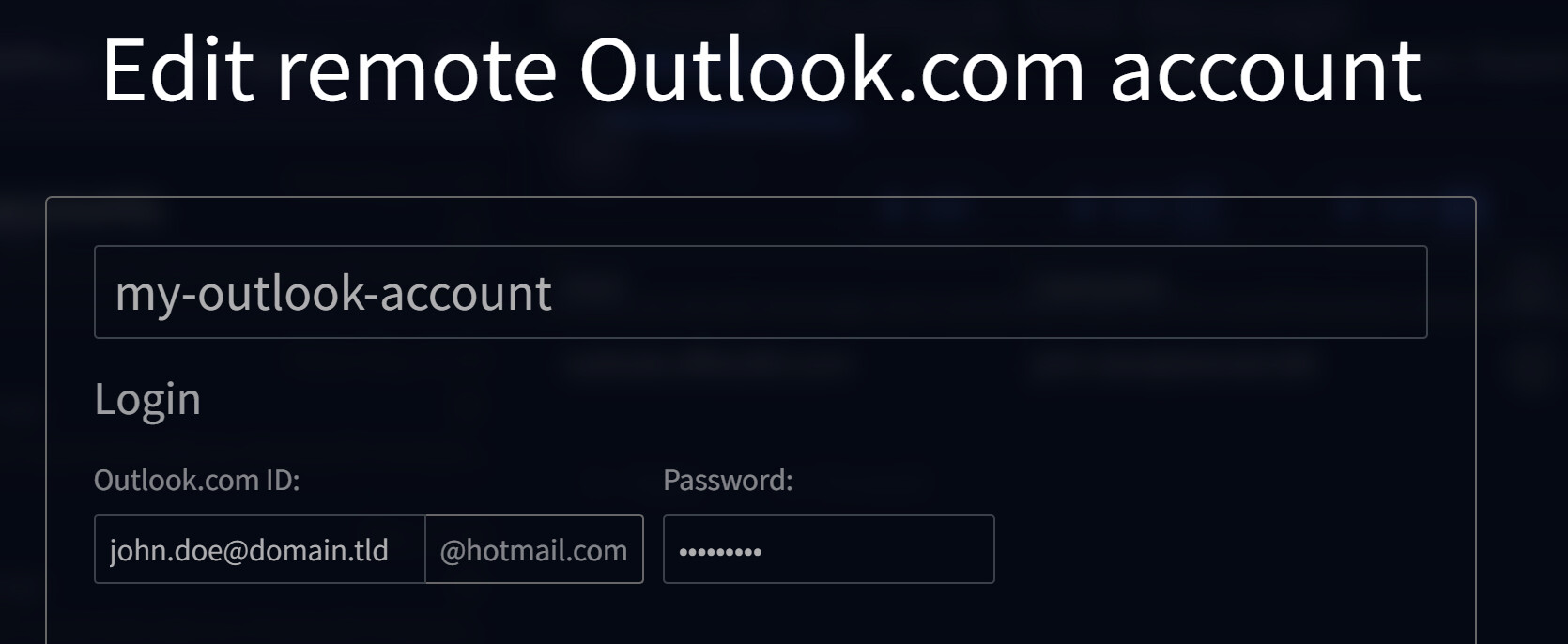
when i go into the edit menu of the connection it changed from “remote pop3” to “outlook”
wich is bad, because now the edit field looks different and it always shows @hotmail.com
my login is usually blub@<mydomain.xxx> and then the PW.
but now it seems the interface goes:
blub@<mydomain.xxx>@hotmail.com
wich of course would explain the authentication failure.
i am stumped
how do i get the pop 3 connection running in the web mailer again?
please help.
what was the exact POP3 host you have set up?
assuming that you have used the usual recommended host (which most probably was outlook.office365.com) you are seeing an unfortunate situation when the Hotmail template is selected for that account (but only if you are also using SSL and 995).
you may try the following workaround: instead of the recommended hostname use outlook.office.comwhich should “magically” work.
based on your report I’ll try to get an internal bug report but hopefully till there will be a fix you may use the above workaround.
HTH,
Ioan
Dear indrais
thanks alot for the reply
I tried every combination but cant get it to work. so far no pop 3 mail pickup 
Yes the original host is: outlook.office365.com and that doesnt work (due to the hotmail template)
i tried outlook.office.com as per suggestion but get an authentication error
I double checked on the outlook365 site, Pop pick up is enabled for the accounts.
POP3 und IMAP4 in Exchange Online | Microsoft Learn
and
POP-, IMAP- und SMTP-Einstellungen für Outlook.com - Microsoft-Support
its in german but the connection info should be readable.
the 2nd link states that “Modern Auth/OAuth2.” is required.
is that a dedicated setting i need to enable somewhere?
thank you for your assistance on the matter.
Hello,
Please follow these steps:
1/ remove the account you have already set
2/ configure the hostname with outlook.office365.com and port 995 with SSL
3/ now comes the most important thing: when completing the Username field please enter your full email address - like in the following example
4/ after you finish adding the remote account it should look like below:
At any later time, if you need to edit the account details do not worry that @hotmail it is shown on screen - the important thing is to have your full email address set correctly in the Outlook.com ID field, like below:
If you follow these steps and it is still not working please set the Log Level to Protocol Communication for Remote POP service (from WebAdmin > Services > Remote POP > Logging) and post here the Axigen log lines relevant to connecting to Office365 POP3 service so we could see exactly what it is happening.
Note: just in case you are wondering where the Axigen logs are saved you should check for default.txt or everything.txt in the log folder from the Axigen working folder (on Linux it should be in /var/opt/axigen).
HTH,
Ioan
PS: If your Office365 POP3 account is not set in the traditionally way (with username and password) than you will have to request this option to be enabled for your account.
Dear Indreias,
thank you for your support.
I went through the post as described but no luck.
so i turned on the protocol level log and this is what is written in the everthing.txt log file:
snip
5-11-08 17:04:34 +0100 08 DESKTOP-4R2IKO4 RPOP:00005CAE: rpop connection for account @.de rescheduled in 10 minutes
2025-11-08 17:05:28 +0100 08 DESKTOP-4R2IKO4 DNR:00000000: Search A for ‘outlook.office365.com’ (EDNS is on)
2025-11-08 17:05:28 +0100 08 DESKTOP-4R2IKO4 DNR:00000000: Sending query (1/1) to 8.8.8.8:53
2025-11-08 17:05:28 +0100 08 DESKTOP-4R2IKO4 DNR:00000000: Replace query for ‘outlook.office365.com’ with CNAME ‘ooc-g2.tm-4.office.com’
2025-11-08 17:05:28 +0100 08 DESKTOP-4R2IKO4 DNR:00000000: Sending query (1/1) to 8.8.8.8:53
2025-11-08 17:05:28 +0100 08 DESKTOP-4R2IKO4 DNR:00000000: Replace query for ‘ooc-g2.tm-4.office.com’ with CNAME ‘outlook.ms-acdc.office.com’
2025-11-08 17:05:28 +0100 08 DESKTOP-4R2IKO4 DNR:00000000: Sending query (1/1) to 8.8.8.8:53
2025-11-08 17:05:28 +0100 08 DESKTOP-4R2IKO4 DNR:00000000: Replace query for ‘outlook.ms-acdc.office.com’ with CNAME ‘AMS-efz.ms-acdc.office.com’
2025-11-08 17:05:28 +0100 08 DESKTOP-4R2IKO4 DNR:00000000: Sending query (1/1) to 8.8.8.8:53
2025-11-08 17:05:28 +0100 08 DESKTOP-4R2IKO4 DNR:00000000: ‘AMS-efz.ms-acdc.office.com’ found A ‘40.101.83.18’
2025-11-08 17:05:28 +0100 08 DESKTOP-4R2IKO4 DNR:00000000: ‘AMS-efz.ms-acdc.office.com’ found A ‘52.97.250.226’
2025-11-08 17:05:28 +0100 08 DESKTOP-4R2IKO4 DNR:00000000: ‘AMS-efz.ms-acdc.office.com’ found A ‘52.97.200.178’
2025-11-08 17:05:28 +0100 08 DESKTOP-4R2IKO4 DNR:00000000: ‘AMS-efz.ms-acdc.office.com’ found A ‘40.99.204.162’
2025-11-08 17:05:28 +0100 08 DESKTOP-4R2IKO4 RPOP:00005CAF: rpop connection successfully started for account @.de
2025-11-08 17:05:28 +0100 16 DESKTOP-4R2IKO4 RPOP:00000000: >> SSL: client hello, remote 52.97.250.226:995, session id bf4d3538d172748453fd20bd632d34d6aecb2948f63cc8013b66820210444aea
2025-11-08 17:05:28 +0100 16 DESKTOP-4R2IKO4 RPOP:00000000: >> SSL: client hello, remote 52.97.250.226:995, 31 cipher suites: 130213031301c02cc030009fcca9cca8ccaac02bc02f009ec024c028006bc023c0270067c00ac0140039c009c0130033009d009c003d003c0035002f00ff
2025-11-08 17:05:28 +0100 16 DESKTOP-4R2IKO4 RPOP:00000000: >> SSL: client hello, remote 52.97.250.226:995, supported version TLS 1.3 (0304) TLS 1.2 (0303) TLS 1.1 (0302) TLS 1.0 (0301)
2025-11-08 17:05:28 +0100 16 DESKTOP-4R2IKO4 RPOP:00000000: << SSL: server hello, remote 52.97.250.226:995, version TLS 1.3 (0304)
2025-11-08 17:05:28 +0100 16 DESKTOP-4R2IKO4 RPOP:00000000: << SSL: server hello, remote 52.97.250.226:995, session id 3f3300005e161b69ace1eb0c079a49ca5f35682481f20e62231f4933417cba9d
2025-11-08 17:05:28 +0100 16 DESKTOP-4R2IKO4 RPOP:00000000: << SSL: server hello, remote 52.97.250.226:995, cipher suite c030
2025-11-08 17:05:28 +0100 16 DESKTOP-4R2IKO4 RPOP:00005CAF: << +OK The Microsoft Exchange POP3 service is ready. [QQBNADAAUABSADAAMgBDAEEAMAAxADcANgAuAGUAdQByAHAAcgBkADAAMgAuAHAAcgBvAGQALgBvAHUAdABsAG8AbwBrAC4AYwBvAG0A]
2025-11-08 17:05:28 +0100 16 DESKTOP-4R2IKO4 RPOP:00005CAF: >> USER @.de
2025-11-08 17:05:28 +0100 16 DESKTOP-4R2IKO4 RPOP:00005CAF: << +OK
2025-11-08 17:05:28 +0100 16 DESKTOP-4R2IKO4 RPOP:00005CAF: >> PASS *****
2025-11-08 17:05:29 +0100 16 DESKTOP-4R2IKO4 RPOP:00005CAF: << -ERR Logon failure: unknown user name or bad password.
2025-11-08 17:05:29 +0100 02 DESKTOP-4R2IKO4 RPOP:00005CAF: rpop connection for account @.de ended, status: 16;Authentication failed
2025-11-08 17:05:29 +0100 08 DESKTOP-4R2IKO4 RPOP:00005CAF: rpop connection for account @.de rescheduled in 10 minutes
2025-11-08 17:06:20 +0100 08 DESKTOP-4R2IKO4 WEBMAIL:00005CB0: [192.168.11.4:80] connection accepted from [3.137.73.221:52380]
2025-11-08 17:06:20 +0100 16 DESKTOP-4R2IKO4 WEBMAIL:00005CB0: << ���
2025-11-08 17:06:20 +0100 16 DESKTOP-4R2IKO4 WEBMAIL:00005CB0: >> 400 Bad Request
2025-11-08 17:06:20 +0100 08 DESKTOP-4R2IKO4 WEBMAIL:00005CB0: <> u= code=400 time=15
2025-11-08 17:06:20 +0100 08 DESKTOP-4R2IKO4 WEBMAIL:00005CB0: connection closed with [3.137.73.221:52380]
snip
If i read that correctly, the log states that either
Username or password are wrong.
i double and tripple checked, that is the right password. using that on the web interface from microsoft works just fine.
So regarding the “classical pop” i checked the outlook365 mail settings and there is :

https://gyazo.com/8737ecc9c319be77282fa904e456892d
the text is german but the slider for pop and imap is moved to the right side, wich i guess would be “enabled”
on the interface for the main account (where all my email accounts are configured) the security featres are turned off, as the support advised me to do to enable pop on the 365 side.
bump anything else i can try?
Yes, you have to check with any mail client that the POP3 credentials you are trying to use (username and password) are working fine. We are talking here about the legacy POP3 authentication and not any modern one like OAuth.
If you validate the POP3 credentials with any mail client and using them in Axigen still create problems we’ll have to use a simple openssl POP3 login test session to double check those credentials.
HTH,
Ioan