Reasons to Switch from Zimbra to Axigen
What organizations moving off Zimbra tell us matters most
One vendor owns the whole stack
Axigen is a single integrated product — no assembling and patching a pile of separate open-source components, and one support team for everything.
Simple to install, even clustered
Get a single server running in minutes; stand up a high-availability cluster from the same package, without stitching third-party pieces together.
Real mobile apps for iOS and Android
Native Axigen apps for iOS and Android plus Mobile WebMail give users a full mobile experience out of the box — no paid add-on just to get mail on a phone.
First-party migration
The Axigen Migrator brings your email and your PIM — contacts, calendars, tasks, and account preferences — across, not just the inbox.
Built for providers & public-sector organizations
Multi-domain, delegated admin, per-domain branding, and WHMCS provisioning for MSPs and hosters who resell mail.
Data sovereignty by default
Fully self-hosted and truly multi-platform — Linux (x86 and ARM), Windows, Docker, and Kubernetes. Your mail stays inside your own network and jurisdiction.
And the part your users notice first…
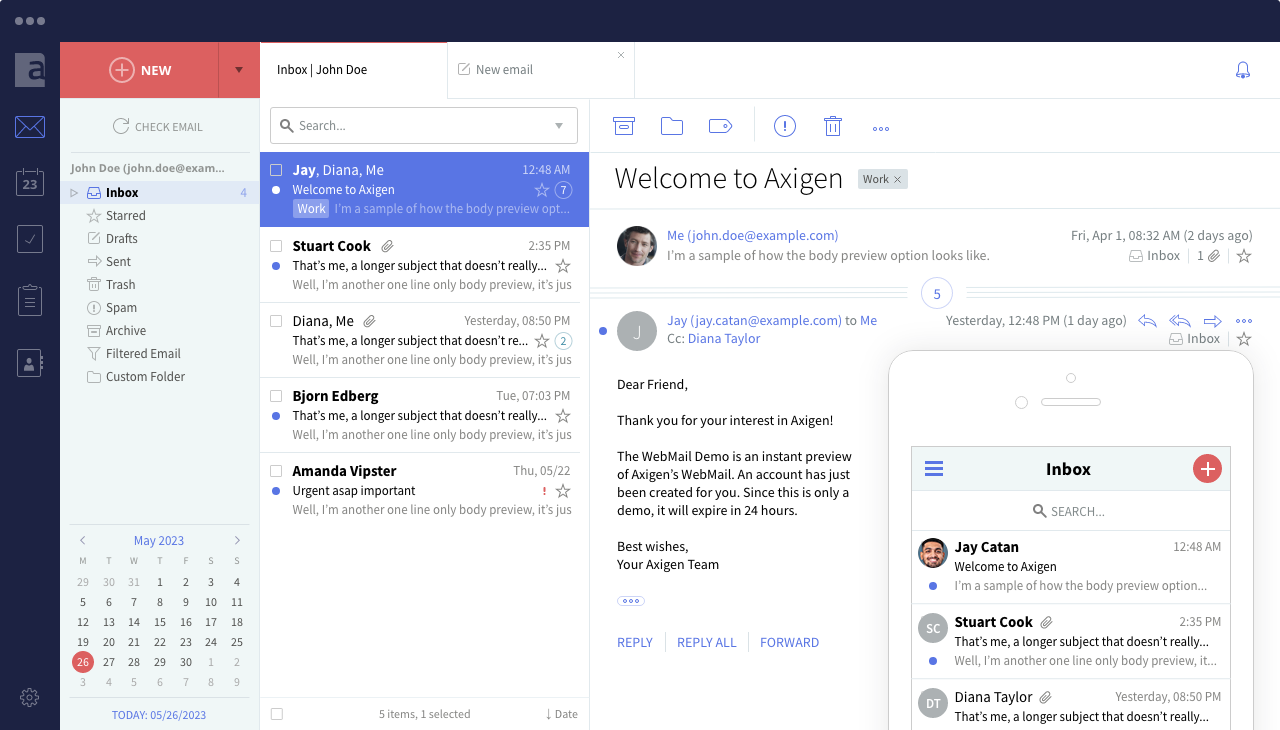
The Axigen WebMail they'll actually enjoy using
Axigen vs. Zimbra: Self-Hosted Mail Server Comparison
The real difference is not a feature checklist — it is who owns the stack, how hard it is to run, and what your users get on their phones.
| AXIGEN | ZIMBRA 10 | |
|---|---|---|
| Architecture & deployment | One integrated product from a single vendor — a single server installs in minutes, and it clusters for high availability from the same package, without stitching third-party pieces together. | Assembled from separate services — Postfix, OpenLDAP, Jetty / Java, MariaDB, Amavis / ClamAV — that you deploy, patch, and keep compatible yourself. |
| Mobile | Full mobile out of the box — native Axigen apps for iOS and Android and Mobile WebMail; ActiveSync available too. | Store apps are stale and low-rated; real mobile means ActiveSync into the phone's stock app — a paid, Professional-edition-only feature. |
| Version support | Predictable: the latest two major versions are supported, with maintenance updates about every two weeks and one major release a year — all applied as in-place upgrades. | General support for v9 and the first v10 release ended June 30, 2025; existing customers had to move to Daffodil v10 by that date to stay supported. |
| Support | 24/7 direct support for the entire stack, from the vendor that made it. | Tiered by edition and routed through partners. |
One Integrated Product vs. Multiple Open-Source Components
Axigen is an all-in-one product — we build and own the whole stack, so it does not mix and match any open-source components.
- MTA
- WebMail & WebAdmin
- AntiVirus & AntiSpam
- Directory & Database
- Clustering & HA
- …
ONE PRODUCT · ONE UPGRADE
MANY COMPONENTS · MANY UPGRADES
Migrating from Zimbra to Axigen
Moving off Zimbra is gradual and low-risk — your Zimbra server keeps running until you are done, so there is no point of no return.
- Install Axigen on Linux, Windows, Docker, or Kubernetes.
- Point Automatic Migration at your Zimbra server over IMAP.
- Users log in to Axigen and their mail is pulled across at first login — no password resets, no big-bang cutover, everyone moves on their own schedule.
- Run the Axigen Migrator — Axigen's first-party Zimbra migration tool — to bring contacts, calendars, tasks, and account preferences across (Zimbra 8.x – 10.x), not just the inbox.
- Cut over DNS once everyone has moved.
Migrating a larger deployment? Our team will help you plan and validate the cutover. Read the full walkthrough in the migrating from Zimbra to Axigen documentation, see how Automatic Migration works, or read about Zimbra PIM migration in the Axigen Migrator.
You don't have to move to the cloud to leave Zimbra.
Stay self-hosted with Axigen.
Stay Self-Hosted Instead of Moving to Microsoft 365 or Google
When Zimbra shops start looking, the loudest advice is "just move to Microsoft 365 or Google Workspace." Axigen keeps you where Zimbra put you in the first place — self-hosted and data-sovereign — while removing the parts that made Zimbra hard to run.
Move to Microsoft 365 or Google
- A per-seat subscription, forever
- Your data in someone else's cloud
- Costs that rise as you grow
Stay self-hosted with Axigen
- Own the whole platform — self-hosted and data-sovereign
- Mail stays in your own network and jurisdiction
- Brandable and resell-ready for MSPs
From MSPs reselling branded mailboxes to schools, universities, and colleges, and government agencies — including organizations in law enforcement and national-security environments where mail simply cannot leave their own infrastructure — they choose Axigen when they need to own their email outright.

Join the Providers Who Own Their Email
9,000 domains, 15,000 accounts, 1 email solution — Axigen
Axigen gives us a product that competes with the best in today's market.
[...] Axigen's support is second to none. Issues, feature requests, bugs are all addressed / added / fixed in record time. Email is too vital to have any downtime.
Bradley SilvermanSenior Technical Operations
Frequently Asked Questions
Yes. The Axigen Migrator brings contacts, calendars, tasks, and account preferences across — not just email — for Zimbra 8.x through 10.x.
No password resets. Automatic Migration pulls each user's mail at first login, so users move over gradually on their own schedule, and your Zimbra server keeps running until the move is complete.
In Zimbra, mobile really means ActiveSync into the phone's stock mail app, and ActiveSync is a paid, Professional-edition-only feature. With Axigen, users get a full mobile experience straight away through the native Axigen apps and Mobile WebMail — no paid add-on required. (ActiveSync is available too, for those who prefer syncing to the phone's built-in mail app.)
Zimbra Inc. no longer offers a free edition of its own: Zimbra 10 requires a paid license (Professional or Standard), and the last free official binary — 8.8.15 — is end-of-life. The source is still published, so some third-party projects repackage it into free community builds, but those are unofficial and unsupported.
Zimbra's source code is still published, but Zimbra Inc. no longer ships a free, ready-to-run edition of its own for versions 9 and 10 — you would build from source or rely on an unofficial third-party repackage, then support it yourself. If you want a supported product you own and can brand, Axigen is a practical alternative.
No — Axigen's code is not open source. But if what you valued about Zimbra's open-source edition was running your own mail, on your own hardware, for free, Axigen offers a free edition that does exactly that — plus commercial editions when you need to scale. And unlike self-compiling from source or leaning on an unofficial third-party repackage, Axigen is a fully supported product with a real, human-backed support team behind it, 24/7.
Yes — it is built for organizations that run their own mail: MSPs and hosting providers, schools, universities, and colleges, and government and public-sector agencies. Multi-domain and delegated administration, per-domain branding, WHMCS provisioning for resellers, and self-hosted deployment keep data inside your own infrastructure and jurisdiction.